 PennySleeve
Open sourcing our world-class card scanner, and card data
Everything PennySleeve knows about cards comes from one dataset, CardCorpus: every Pokémon card in English, Japanese and Simplified Chinese, with its copies and the links between them. Today we're publishing that dataset for anyone to use, along with the card scanner from the app: its code, its models, and the index it matches photos against.
If you collect, nothing changes for you. The app and this site work as they did. If you build things, you can now take the same data and the same scanner and make something of your own.
The dataset
The snapshot published today holds:
- 916 sets
- 67,243 cards
- 106,101 copies: holo, reverse holo, 1st Edition, stamps and the like
- 44,702 links between the same card in different languages
- 19,390 paintings shared across cards
- 1,604 ways promos were given out
- 1,025 Pokémon, 428 characters and 494 artists
The copies and the links are the part we couldn't find anywhere else. Other Pokémon card datasets online list cards, but not which copies of each card exist, which cards in other languages are the same card, which cards share a painting, or how a promo was given out. Those are what a collector needs to know which card they're holding, so they're in here, card by card.
It's plain JSON, one file for each set plus files for Pokémon, characters, artists, paintings and distributions. Every file has a JSON Schema.
There are three ways to get it:
- Browse it on GitHub at cardcorpus/pokemon-card-dataset.
- Download it all at once. The repository's releases have the whole snapshot as a zip of about 37 MB.
- Query the live copy at pokemon.cardcorpus.com/v1. It has the same layout, and it's updated more often than the snapshots.
The data is under CC BY 4.0: use it for anything, as long as you credit CardCorpus. Card pictures aren't in the download. Each picture is an id that turns into a link to our image mirror.
If you spot a mistake, such as a missing card, a wrong date, or two cards linked that aren't the same, please open an issue with a link to a page or picture that shows it. We research each report, fix it at the source, and the fix shows up in the app, on this site and in the next snapshot.
The scanner
The scanner is what names cards when you point PennySleeve's camera at a binder page. The app runs it in Swift on your phone, and this release is its Python reference port: on our test sets it agrees with the app on 99% of first picks, with the same accuracy. It's now published as a Python package with a command-line tool and a small web page that runs on your own computer: cardcorpus/pokemon-card-scanner on GitHub, with its models and index on Hugging Face.
pip install "cardcorpus-scanner @ git+https://github.com/cardcorpus/pokemon-card-scanner"
cardcorpus-scan serve
That opens a page where you can drop in a photo, or take one with your webcam. Each card it finds is outlined on the photo and listed with its set, number, rarity, illustrator and copies. Your photos stay on your computer.
Naming a card from a photo takes a few steps, each handled by its own small model:
- Find the cards. A detector finds every card's four corners, so a tilted card on a crowded binder page is still cut out cleanly.
- Match the painting. The card is straightened and fingerprinted, and its fingerprint is compared with pictures of every card in the dataset.
- Read the number. A reader reads the collector number off the card.
- Tell the prints apart. Some paintings were printed in more than one set, and those prints look nearly the same.
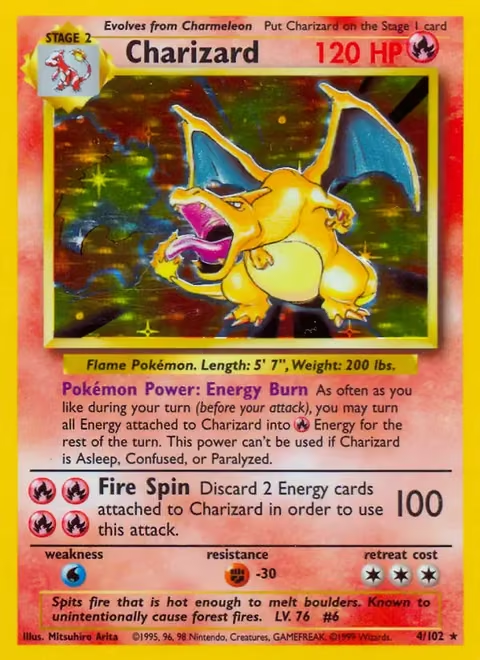
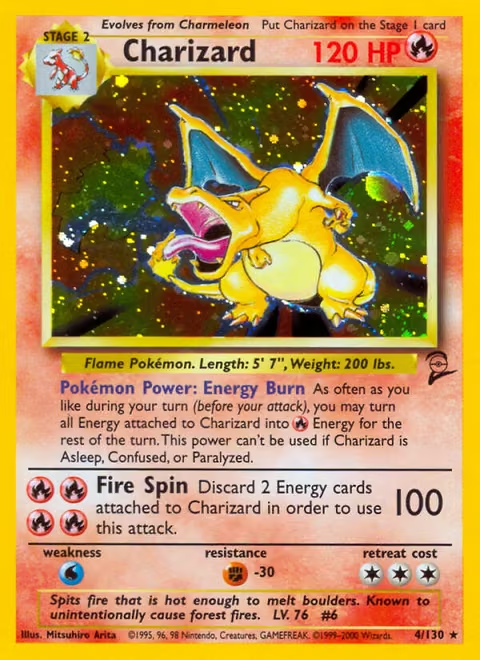
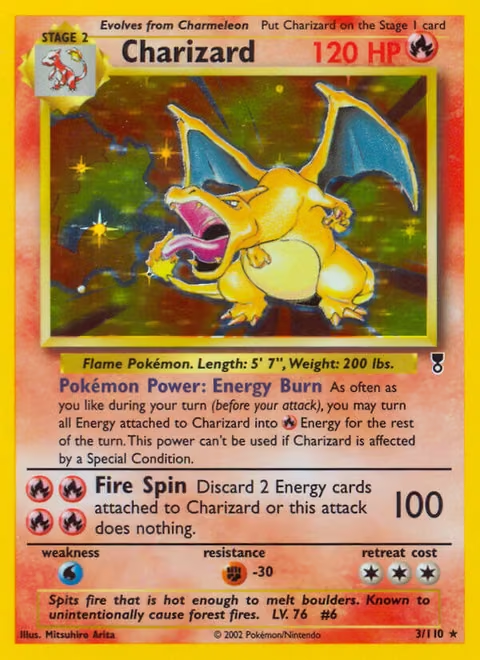
Charizard's painting was printed in Base Set, Base Set 2 and Legendary Collection. To tell those apart, a print picker looks at the whole card. Then a checker lines the photo up with each print's own picture and compares the small places where the prints differ: the set symbol, the number, the copyright line.
- Check the copy. For older English cards it looks for the 1st Edition stamp. For the e-Card sets it looks at the e-Reader strips, which tell a reverse holo from a standard copy.
On photos it never saw in training, its first pick is the exact print for 96.7% of the cards on vintage binder pages, and 89.9% of cards photographed one at a time with a phone.
It answers as it goes. Finding the cards and matching their paintings gives a first answer for every card on a binder page in under a second, about 60 ms a card on a Mac mini's graphics chip. Then each card is double-checked and its answer streams in as it's done, so a 12-card page is finished in about 3 to 4 seconds.
The app runs these same steps on your phone, without needing a connection, and has its first answers in about a third of a second.
Licenses
- The dataset is CC BY 4.0.
- The scanner's code is Apache 2.0.
- The models: the card matcher is fine-tuned from Meta's DINOv3 and is under the DINOv3 License; the other models are Apache 2.0.
- The index of fingerprints is CC BY 4.0.
Each repository lists exactly which license covers which file. Built with DINOv3.
Pokémon and its card pictures belong to Nintendo, Creatures, GAME FREAK and The Pokémon Company, and older cards also to Wizards of the Coast. This project isn't affiliated with or endorsed by any of them.
Sources
- Dataset: github.com/cardcorpus/pokemon-card-dataset
- Live dataset: pokemon.cardcorpus.com/v1
- Scanner code: github.com/cardcorpus/pokemon-card-scanner
- Scanner models and index: huggingface.co/cardcorpus/pokemon-card-scanner